- Shafin Gida /
- Littattafai /
- Computing & Internet /
- Programming /
- Introduction /
- SIEMENS PLC PROGRAMMING FOR BEGINNERS: LEARN ...
0 ratings



Lambar abu:
115463834
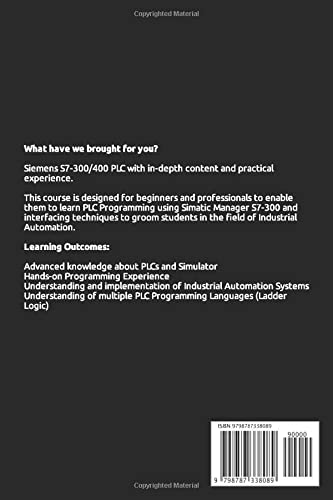
SIEMENS PLC PROGRAMMING FOR BEGINNERS: LEARN SIEMENS PLC PROGRAMMING WITH S7-300/400 Automating Project Examples inside TIA portal and Factory IO
Lambar abu:
115463834
XAF 17279
Price Details
Excluding Shipping & Custom charges ( Shipping and custom charges will be calculated on checkout )
*All items will import from Ƙasar Birtaniya
0 ratings
Rubuta bita
A Stock
 An shigo da shi daga kantin UK
QTY:
Yi Oda yanzu, a samu nan da Laraba, Oktoba 21
Secured transaction
Ubuy works hard to protect your security and privacy. Our advanced payment security system ensures confidentiality by encrypting your information during transmission using AES (Advanced Encryption Standards) and SSL (Secure Socket Layer) protocols. Your payment details are 100% secure as we do not share your payment details with third party sellers.
Our Top Logistics Partners


Fast
Shipping

Free
Return*

Secure Packaging

100% Original Products

PCI DSS Compliance

ISO 27001 Certified



Bayanin samfur
- Brief Description✓Recognize S7 hardware and be able to replace modules when they fail.✓To do specific operations, you must use the Step 7 software.✓Understand the basic S7 instruction set and perform minimal software changes.✓When necessary, be able to backup and restore a PLC program.✓When an issue arises, be able to run basic system diagnostics.✓Learn how to communicate from a PLC to Factory IO.✓Make changes to the PLCSIM and Factory IO.To find a system, you must first understand how it operates.Then you'll need to understand the details.HOW DO I GO ABOUT DOING THE FOLLOWING?(Some are straightforward, while others aren't)How can I ensure the electricity is turned on and the PLC is set to the correct mode? (RUN or Program).Look for any signs of a problem (is SF LED ON).Make a connection to the PLC (accessible nodes).Check the PG/PC interface if you have a communication problem.Make a backup of your existing project by creating a new one (just in case I mess up).Open a PLC project and go online.Buffer for Interrogate Diagnostics.Determine whether the problem is caused by hardware or software.If required, switch modules (with spares and without spares).Determine whether the issue is with the PLC or the communications system (PLCSIM).✓Check all settings, such as Node Address, against a template.✓Examine the hardware configuration.✓Download the application and clear your memory.✓Compare the software to the most recent version (Compare function).✓Program to keep an eye on.✓Specific operands and instructions are sought.✓Changing the timer and counter values in real-time.✓Offline and online minor modifications.✓To determine parameter status, check or construct a VAT table.✓If necessary, force a parameter.✓To assist with software diagnostics, call up reference data.✓Project Archive and Retrieval.♥Documentation is displayed (Symbols, Comments).♥Change software addresses and reassign an I/O address (Rewire Function).♥Configuration of Analog Inputs at a Basic Level.♥Printing cross-references, program listings, and other information.♥Using PLCSIM to communicate from an 3D Simulator to a PLC.♥Add pushbuttons, a data display, and alarms to an existing 3D Simulator.There was also some background information provided.The following is to be understood:✓Bits, bytes, words, and double words are examples of number formats.✓Integer, binary, HEX, octal, floating-point✓Data types and parameter types, such as Bool, are examples of data types and parameter types.✓Types that change (local and global)✓How to keep track of various blocks✓Programs ladder✓Contacts, Set, Reset, and Other Basic Instructions✓Counters and Timers✓Scalling✓How to make minor alterations✓Values in a VAT table can be changed.✓Going backwards through a program to see where the power flow stops✓Reset method in general✓Tips for spotting flawsDocumentation for the Course◆Reference Guide for Simatic Manager S7◆SIMATIC STEP 7 (TIA Portal) ®Equipment for the Course ★PLC S7 300 or 400.★PLCSIM.★Laptop or PC?★Simulator Factory IO.
| Publisher | Independently published |
| Publication date | 19 Dec. 2021 |
| Language | English |
| Print length | 345 pages |
| ISBN-13 | 979-8787338089 |
| Item weight | 531 g |
| Dimensions | 15.6 x 1.98 x 23.39 cm |
KWATANCEN ABUN
SIEMENS PLC PROGRAMMING FOR BEGINNERS: LEARN SIEMENS PLC PROGRAMMING WITH S7-300/400 Automating Project Examples inside TIA portal and Factory IO
Kuna da wata tambaya? Yi taɗi da mu
Tambayoyi & Amsoshi Abokin Ciniki
-
Tambaya:
Yadda ake Siyayya SIEMENS PLC PROGRAMMING FOR BEGINNERS: LEARN SIEMENS Kan layi Daga Ubuy?
Amsa: Yana da sauƙi don siyayya SIEMENS PLC PROGRAMMING FOR BEGINNERS: LEARN SIEMENS akan layi daga Ubuy.. Dole ne kawai ku nemo samfurin, zaɓi hanyar jigilar kaya yayin dubawa kuma a kai shi wurin da kuke. -
Tambaya:
Ana samun SIEMENS PLC PROGRAMMING FOR BEGINNERS: LEARN SIEMENS don siyayya akan layi a cikin Chad?
Amsa: Ee, a Ubuy Chad wannan samfurin yana samuwa gare ku don siyayya akan farashi mai ma'ana.. Ba a samun SIEMENS PLC PROGRAMMING FOR BEGINNERS: LEARN SIEMENS a cikin gida amma kuna iya amincewa da mu da ayyukan jigilar mu na yau da kullun. -
Tambaya:
Yaya tsawon lokacin da ake ɗauka don samun samfur bayan Sanya oda?
Amsa: Lokacin isar da samfurin da aka umarce ku ya bambanta gwargwadon abin da kuka yi oda da hanyar jigilar kaya da kuka zaɓa.. An ambaci lokacin isar da kiyasin yayin aiwatar da biyan kuɗi, don haka a kula yayin sayayya.
Introduction Editorial Review
Ba a sami sake dubawa na edita ba
Customer Reviews & Ratings
27 Ƙimar da abokan ciniki suka bayar
-
5 Tauraruwa
66%
-
4 Tauraruwa
12%
-
3 Tauraruwa
22%
-
2 Tauraruwa
0%
-
1 Tauraruwa
0%
Yi bitar akan wannan Samfurin
Faɗan wa sauran Abokan ciniki ra'ayin ka
Product Price History
Sanarwa mai amfani
- Iyakoki: Don Abubuwan da aka yi sufurin su daga ƙasashen waje, a lura da cewa garanti ɗin mai ƙira ba lallai ya yi aiki ba; wajan neman taimakon mai ƙira ba lallai ya samu ba; kuma Littafin Sanin yanda abu yake aiki, hanyoyin tsaro da umarni ba lallai ya kasance a yaren ƙasar mai siya ba; Samfurin kaya (da sauran kayan haɗi) ba lallai ne an ƙera su a bisa tsarin ƙasar da za a kaya kayan ba, da ƙayyadaddun bayanai, ko dokar yin alama ko laƙabi; kuma ba lallai bane samfuran kayan su dace da ma'aunin wutar lantarki na voltage ɗin kasar da sauran dokokin ƙasa na wutar lantarki (wanda za'a buƙaci amfani da na'urar adafta ko na'urar canza launi idan ya dace). Mai karɓar kaya shi/ita ke da alhakin tabbatar da cewa samfurin da aka siya za'a iya shigo da shi ƙasar da za'a kai a bisa dokar ƙasar. A yayin yin oda daga Ubuy ko masu alaƙa da su, mai karɓar oda ne mai shigo da kaya, kuma dole ya/ta tabbarar da cewa ya/ta bi duka dokokin ƙasar da za'a kai kayan.
- Ba dukkan abubuwan da aka saka a kan Ubuy bane na sayar wa, don Ubuy wajen bincike ne na duk duniya. Duk wani Samfurin abu yana da dokokin shige da fice na ƙasashe da kuma dokokin siye da sayar wa.
XAF 17279
Yi Oda yanzu, a samu nan da Laraba, Oktoba 21
This item is not restrict in my country.(Please click on above link if this item is not restrict in your country, So our team will review and allow.)
QTY:
Secured transaction
PCI DSS compliant and ISO 27001:2022 certified, with encrypted payments and full buyer protection on every order.
Our Top Logistics Partners
Fastest cross-border delivery
Ubuy Assurance
Experience worry-free shopping with 100% original products, PCI DSS-compliant payment security, ISO 27001-certified data protection, the fastest cross-border delivery, free returns *, and secure packaging on every order.