0 ratings

Lambar abu:
814878
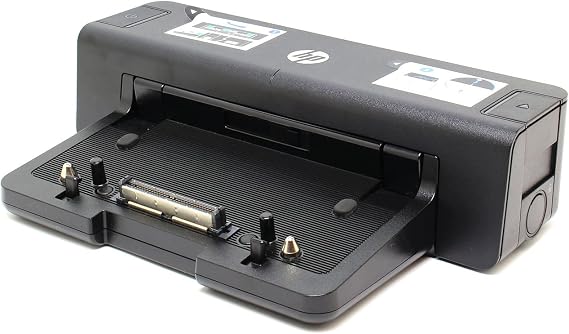
HP A7E32 90W Docking Station - Port Replicator - A7E32AA
Lambar abu:
814878
XAF 30998
Price Details
Excluding Shipping & Custom charges ( Shipping and custom charges will be calculated on checkout )
*All items will import from Ƙasar Amurika US
0 ratings
Rubuta bita
A Stock
 An shigo da shi daga kantin USA
QTY:
Yi Oda yanzu, a samu nan da Alhamis, Agusta 13
Secured transaction
Ubuy works hard to protect your security and privacy. Our advanced payment security system ensures confidentiality by encrypting your information during transmission using AES (Advanced Encryption Standards) and SSL (Secure Socket Layer) protocols. Your payment details are 100% secure as we do not share your payment details with third party sellers.
Our Top Logistics Partners


Desktop convenience with full port replication capability in a space-saving design.

Fast
Shipping

Free
Return*

Secure Packaging

100% Original Products

PCI DSS Compliance

ISO 27001 Certified


Note: Step Down Voltage Transformer required for using electronics products of Ƙasar Amurika US store (110-120). Recommended power converters Saya yanzu.


What Stands Out
Multiple Connectivity
The HP A7E32 Docking Station offers extensive connectivity options, including USB, HDMI, and Ethernet ports, enabling seamless connection to various devices for increased productivity and convenience.
Compact Design
Its compact design minimizes desk clutter while providing essential ports, appealing to professionals seeking efficiency without sacrificing valuable workspace.
Power Delivery
With 90W power delivery, this docking station charges compatible laptops while providing robust connectivity, ensuring devices are powered during consistent use without interruptions.
Bayanin samfur
| Hardware Interface | USB 3.0 |
| Compatible Devices | HP ELITEBOOK 8xxx Series |
| Total Usb Ports | 4 |
| Number of Ports | 14 |
| Wattage | 90 watts |
| Smart Home Compatibility | Not Smart Home Compatible |
| Item Weight | 4.3 Pounds (1.95 kg) |
| Color | Black |
| Brand | HEWLETT-PACKARD |
| UPC | 887111347237 804066549561 886112501693 |
| Manufacturer | hp |
| Model Number | A7E32AA#ABA |
| Mfr Part Number | A7E32AA#ABA |
| Total USB Ports | 4 |
| Number of Items | 1 |
Who Should Buy?

-
Business Professionals
Ideal for professionals needing multiple connections for monitors, printers, and peripherals in a workstation setup.
-
Frequent Travelers
Lightweight and efficient, perfect for users who require easy docking and undocking while on the go.
-
Home Office Users
Great solution for home office setups, providing essential connectivity without cluttering desk space.

-
Gaming Enthusiasts
May not support high-performance graphics required for gaming, limiting graphics-intensive tasks.
KWATANCEN ABUN
HP A7E32 90W Docking Station - Port Replicator - A7E32AA
Kuna da wata tambaya? Yi taɗi da mu
Tambayoyi & Amsoshi na Abokan Ciniki
-
Tambaya:
What devices are compatible with the HP A7E32 90W Docking Station?
Amsa: The HP A7E32 90W Docking Station is primarily designed for HP laptops that feature a Smart Ac connector, USB Type-C, or legacy USB connections. It supports various HP professional series laptops like EliteBook, ProBook, and ZBook models. This versatility ensures that users can connect multiple devices, such as monitors, keyboards, and mice, enhancing their productivity. This makes it ideal for users working in office environments or for those looking to create an efficient workstation setup at home. -
Tambaya:
What ports does the HP A7E32 Docking Station offer?
Amsa: The HP A7E32 Docking Station features a comprehensive array of ports, including HDMI, DisplayPort, USB-C, and USB-A ports, as well as Ethernet and audio jacks. This rich selection allows users to connect multiple peripherals and displays, essential for multitasking and creating a seamless workflow. For instance, a user can connect a dual monitor setup while also having printers and external storage devices connected, making it ideal for professionals who rely on multiple tools for their work. -
Tambaya:
Does the HP A7E32 Docking Station support dual monitors?
Amsa: Yes, the HP A7E32 Docking Station supports dual monitor setups. With one HDMI and one DisplayPort, users can easily extend their workspace to two external displays. This capability is particularly beneficial for graphic designers, financial analysts, or anyone requiring detailed multitasking across multiple applications. Consider a situation where a user has a spreadsheet open on one monitor while running a presentation on another, boosting their efficiency and productivity. -
Tambaya:
Is the HP A7E32 Docking Station plug and play?
Amsa: Yes, the HP A7E32 Docking Station is designed for plug-and-play functionality, allowing for a hassle-free setup. Users can simply connect their laptop to the dock, and it will automatically recognize the connected devices without needing to install additional software. This means that even those who may not be tech-savvy can quickly set up their workstation without technical difficulties. Such simplicity is a real advantage for temporary setups, such as occasionally working from home or in shared offices. -
Tambaya:
What is the power output of the HP A7E32 Docking Station?
Amsa: The HP A7E32 Docking Station provides up to 90W of power to connected devices, which is adequate for most HP laptops and ensures that users can work without worrying about battery life. This means you can plug in your laptop for charging while using multiple peripherals. For instance, connecting to a monitor and keyboard while ensuring your laptop remains charged, allows for uninterrupted productivity, especially during long working hours. -
Tambaya:
Can I charge my laptop through the HP A7E32 Docking Station?
Amsa: Yes, the HP A7E32 Docking Station allows for charging your laptop while it is docked, providing a convenient all-in-one solution. With its 90W power output, it ensures that compatible HP laptops receive sufficient power during use. This feature is particularly advantageous in preventing downtime, as you can work and charge simultaneously. Imagine an office setup where your laptop is charging as you conduct a presentation on a large screen–it enhances both productivity and efficiency. -
Tambaya:
What type of chargers or cables are needed for the HP A7E32 Docking Station?
Amsa: The HP A7E32 Docking Station typically comes with a compatible power adapter, allowing users to easily connect it to a power source. For connectivity, standard USB-C cables or HDMI/DisplayPort cables for additional monitors are generally recommended. Using the right type of cables ensures optimal performance without data bottlenecks or charging issues. Consider a scenario where a user sets up an efficient multi-monitor display for enhanced productivity in graphic design workflows. -
Tambaya:
Is the HP A7E32 Docking Station compatible with non-HP laptops?
Amsa: The HP A7E32 Docking Station is primarily designed for HP laptops and may not completely support non-HP devices. While certain functions like USB connections might work, key features such as power delivery and display outputs could be limited. This is crucial for users who may need a universal docking solution. If you're using non-HP devices extensively, you might want to ensure compatibility before investing in this dock. -
Tambaya:
What is included in the package of HP A7E32 Docking Station?
Amsa: The HP A7E32 Docking Station package typically includes the docking station itself and a power adapter. Some versions may include documentation for setup and troubleshooting. Expect to receive everything needed to begin connecting your laptop and peripherals right out of the box. This seamless initial setup is especially appealing for businesses looking to deploy multiple workstations efficiently without the hassle of additional purchases. -
Tambaya:
Where can I buy HP A7E32 90W Docking Station - Port Replicator - A7E32AA?
Amsa: You can purchase the HP A7E32 90W Docking Station on Ubuy. Ubuy is a reliable e-commerce platform that offers a range of products, including electronics and accessories. Their user-friendly site makes it simple to find the docking station you need alongside product specifications and customer reviews to aid in your decision-making process.
HEWLETT PACKARD Docking Stations A7E32AA#ABA Editorial Review
Ba a sami sake dubawa na edita ba
Customer Reviews & Ratings
1 Ƙimar da abokan ciniki suka bayar
-
5 Tauraruwa
100%
-
4 Tauraruwa
0%
-
3 Tauraruwa
0%
-
2 Tauraruwa
0%
-
1 Tauraruwa
0%
Yi bitar akan wannan Samfurin
Faɗan wa sauran Abokan ciniki ra'ayin ka
Platform Trust & Buyer Confidence

MA
Mohammad
Verified buyer
“Excellent quality and original too,when ubuy send original things I will appreciate that ,I very satisfied thank you”
23 July 2026 · via Trustpilot
CK
Chitra
Verified buyer
“The order and delivery progress was communicated very well. Package arrived within the estimated time. Products arrived as expected in good condition.”
22-Jul-26 · via Trustpilot
K
kund
Verified buyer
“Good supply of products. Safe payment methods, and shipment worldwide! Genuine products.”
23-Jul-26 · via Trustpilot
OO
Onesi
Verified buyer
“Was my first time buying a product from Ubuy, but I found it so helpful. This is reliable. Gonna place a new order!”
22 July 2026 · via Trustpilot
SJ
SAO JOHN
Verified buyer
“Ubuy is a great online platform to buy stuff. Reliable, fast delivery time and great value for money. I've been using Ubuy online shopping platform for three years now and will continue to do so.”
23 July 2026 · via Trustpilot
Biyan Kuɗi Amintaccen
Global Delivery
Easy Returns
Genuine Products
Product Price History
Sanarwa mai amfani
- Iyakoki: Don Abubuwan da aka yi sufurin su daga ƙasashen waje, a lura da cewa garanti ɗin mai ƙira ba lallai ya yi aiki ba; wajan neman taimakon mai ƙira ba lallai ya samu ba; kuma Littafin Sanin yanda abu yake aiki, hanyoyin tsaro da umarni ba lallai ya kasance a yaren ƙasar mai siya ba; Samfurin kaya (da sauran kayan haɗi) ba lallai ne an ƙera su a bisa tsarin ƙasar da za a kaya kayan ba, da ƙayyadaddun bayanai, ko dokar yin alama ko laƙabi; kuma ba lallai bane samfuran kayan su dace da ma'aunin wutar lantarki na voltage ɗin kasar da sauran dokokin ƙasa na wutar lantarki (wanda za'a buƙaci amfani da na'urar adafta ko na'urar canza launi idan ya dace). Mai karɓar kaya shi/ita ke da alhakin tabbatar da cewa samfurin da aka siya za'a iya shigo da shi ƙasar da za'a kai a bisa dokar ƙasar. A yayin yin oda daga Ubuy ko masu alaƙa da su, mai karɓar oda ne mai shigo da kaya, kuma dole ya/ta tabbarar da cewa ya/ta bi duka dokokin ƙasar da za'a kai kayan.
- Ba dukkan abubuwan da aka saka a kan Ubuy bane na sayar wa, don Ubuy wajen bincike ne na duk duniya. Duk wani Samfurin abu yana da dokokin shige da fice na ƙasashe da kuma dokokin siye da sayar wa.
XAF 30998
Yi Oda yanzu, a samu nan da Alhamis, Agusta 13
This item is not restrict in my country.(Please click on above link if this item is not restrict in your country, So our team will review and allow.)
QTY:
Secured transaction
PCI DSS compliant and ISO 27001:2022 certified, with encrypted payments and full buyer protection on every order.
Our Top Logistics Partners
Fastest cross-border delivery
Fasaloli & Fa'idoji
- Comfortable port replication and cable management.
- Backward compatibility with older devices.
- Charger the notebook while in the docking station.
- Space-saving design with full port replication capability.
- Includes four USB 3.0 ports and DisplayPort 1.2 support.
- Compatible with various HP ProBook and EliteBook models.
Ubuy Assurance
Experience worry-free shopping with 100% original products, PCI DSS-compliant payment security, ISO 27001-certified data protection, the fastest cross-border delivery, free returns *, and secure packaging on every order.