- Page d'accueil /
- Produits de bureau /
- Fournitures de bureau et scolaires /
- Writing & Correction Supplies /
- Technical Drawing Supplies /
- Templates /
- Computer Shortcuts: QuickStudy Laminated Refe...
0 ratings


Numéro d'article:
57413616
Computer Shortcuts: QuickStudy Laminated Reference Guide (Quick Study Computer)
89% des répondants recommanderaient ceci à un ami
Numéro d'article:
57413616
XAF 10744
Détails du prix
Hors frais de livraison et de douane ( Les frais de livraison et de douane seront calculés lors du paiement )
*Tous les articles seront importés depuis États-Unis
0 ratings
Écrire un commentaire
En stock
 Importé depuis la boutique USA
QTY:
Commandez maintenant et recevez votre commande aux alentours du Jeudi, Octobre 15
Transaction sécurisée
Ubuy s'engage à protéger votre sécurité et votre confidentialité. Notre système avancé de sécurité des paiements garantit la confidentialité en chiffrant vos informations lors de la transmission grâce aux protocoles AES (Advanced Encryption Standards) et SSL (Secure Socket Layer). Vos coordonnées de paiement sont 100 % sécurisées car nous ne partageons pas vos informations de paiement avec des vendeurs tiers.
Nos meilleurs partenaires logistiques


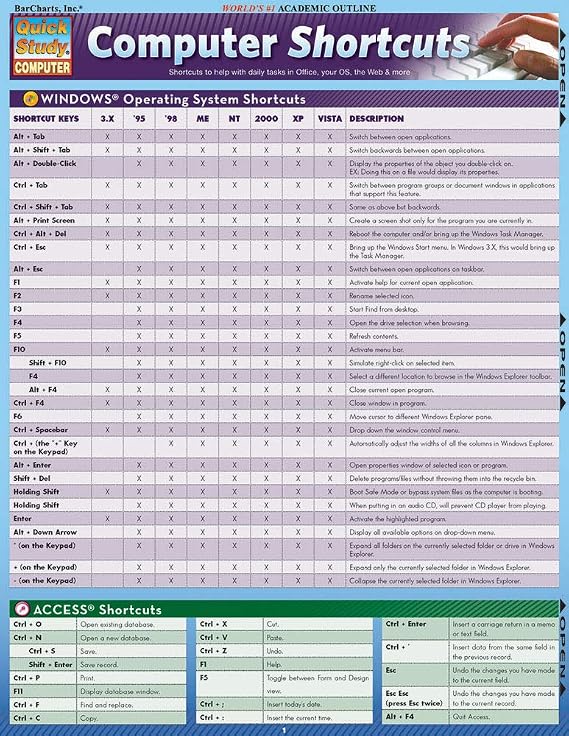
This 2-panel (4-page) guide points out helpful shortcuts that can be found within the most popular Windows PC and Apple Macintosh software.

Livraison
rapide

Retour
gratuit*

Emballage sécurisé

Produits 100 % originaux

Conformité PCI DSS

Certifié ISO 27001



Note: Step Down Voltage Transformer required for using electronics products of États-Unis store (110-120). Recommended power converters Acheter maintenant.


Ce qui se démarque
Comprehensive Coverage
This guide includes an extensive list of computer shortcuts across various software, making it an essential tool for improving productivity and efficiency in both personal and professional settings.
Durable Material
Made from high-quality laminated material, this reference guide is resistant to wear and tear, ensuring longevity and protection against spills and stains for repeated use in busy environments.
Portable Design
The compact pamphlet format allows for easy transportation, making it convenient to reference while working on-the-go, ideal for students, professionals, or anyone looking to boost their computer skills.
Détails du produit
- 2-panel (4-page) guide for saving time while using Windows PC and Apple Macintosh software
- Points out helpful shortcuts for Windows Operating System, Access, FrontPage, PowerPoint, Publisher, QuarkXPress, InDesign, Quicken, UNIX/Linux, Internet Explorer, Mozilla Firefox, Opera, Apple Macintosh
- Includes special character shortcuts for word processing
- Useful for surfing the Web and balancing virtual checkbooks
- Published in September 2008
- Part of the Quick Study Computer Misc. Supplies series
À qui est-ce destiné ?

-
Students
Helpful for students learning computer software, providing quick reference to essential shortcuts for efficient study.
-
Office Workers
Ideal for office professionals needing quick access to keyboard shortcuts to enhance productivity and streamline tasks.
-
Beginner Users
Great for newcomers to computers, helping them quickly learn and memorize essential shortcut keys for various applications.

-
Advanced Users
Not suitable for advanced users who already know shortcuts, may find it too basic and lacking in depth.
DESCRIPTION DU PRODUIT
Computer Shortcuts: QuickStudy Laminated Reference Guide (Quick Study Computer)
Vous avez une question ? Chattez avec nous
Questions et réponses des clients
-
question:
What are the benefits of using computer shortcuts?
répondre: Utilizing computer shortcuts significantly enhances your efficiency and productivity while working. Instead of navigating through multiple menus, you can execute commands with a simple keyboard combination, saving you time and effort. For instance, using 'Ctrl+C' to copy and 'Ctrl+V' to paste can streamline your workflow drastically. This is particularly useful for professionals who work with large datasets or need to manage numerous documents simultaneously. -
question:
How can I learn computer shortcuts quickly?
répondre: Learning computer shortcuts can be done effectively through repeated practice and utilizing cheat sheets. A Quick Study guide can provide you with a comprehensive list of the most essential shortcuts tailored to your operating system. Regularly referencing these shortcuts while you work will help commit them to memory. For example, practicing the shortcuts for document formatting in word processors can vastly improve your document creation speed. -
question:
Are computer shortcuts the same across different platforms?
répondre: No, computer shortcuts can vary significantly between operating systems and applications. For instance, 'Ctrl+Z' undoes an action on Windows, while 'Command+Z' does the same on macOS. Familiarizing yourself with the shortcuts specific to your frequently used software will enhance your effectiveness. This can have a major impact on your productivity, especially if you work in a mixed-platform environment. -
question:
Which computer shortcuts are most useful for office work?
répondre: Some of the most useful shortcuts for office work include 'Ctrl+S' for saving documents, 'Alt+Tab' for switching between open applications, and 'Ctrl+A' to select all text. Knowing these shortcuts can accelerate your workflow and reduce the time spent on repetitive tasks. For instance, if your job involves frequent file management, mastering these shortcuts will make navigating between documents more efficient. -
question:
How do I customize keyboard shortcuts on my computer?
répondre: Customizing keyboard shortcuts can usually be done through the settings or preferences menu of most software applications. This feature allows you to set your own combinations for specific tasks. For example, if you use certain commands frequently, personalizing shortcuts can enhance your workflow. A graphic designer might customize shortcuts in design software to speed up their creative process. -
question:
Can computer shortcuts help with accessibility?
répondre: Absolutely, computer shortcuts can greatly improve accessibility for users with disabilities. Many shortcuts are designed to reduce reliance on a mouse, enabling users to navigate and interact with software more easily. For individuals with mobility restrictions, utilizing keyboard shortcuts can facilitate smoother operation of their devices, making technology more inclusive and user-friendly. -
question:
How do I remember computer shortcuts longer-term?
répondre: To retain computer shortcuts long-term, consistent usage is key. Incorporating these shortcuts into your daily workflow will help embed them in your memory. Using mnemonic devices can also aid memorization. For instance, you might associate 'Ctrl+P' with 'Print' because both words start with 'P'. Regular practice in relevant contexts, like document creation, will reinforce your memory effectively. -
question:
Where can I find a comprehensive list of computer shortcuts?
répondre: A Quick Study guide is an excellent resource for finding a comprehensive list of computer shortcuts. It condenses essential information into an easy-to-reference format, making it a perfect learning tool for users of all skill levels. Utilizing such a guide can help you quickly identify the most relevant shortcuts for your needs, enhancing your productivity during tasks. -
question:
How do different software applications utilize shortcuts?
répondre: Different software applications have unique sets of shortcuts tailored to their functionalities. For example, word processors have shortcuts geared towards text formatting, while spreadsheet programs focus on data manipulation. Familiarizing yourself with these specialized shortcuts can help maximize your efficiency. In a data analysis role, knowing the shortcuts for navigating and manipulating data in spreadsheets can significantly speed up your analysis tasks. -
question:
Where can I buy Computer Shortcuts Quick Study Computer Misc. Supplies?
répondre: You can purchase the Computer Shortcuts Quick Study guide from Ubuy in Chad. Ubuy offers a variety of educational resources, including this guide, which is designed to help you enhance your computer skills by providing a concise summary of essential shortcuts.
QuickStudy Templates Editorial Review
Customer reviews for the Computer Shortcuts Quick Study Computer Misc. Supplies are mixed. While some customers find it to be a very useful and affordable product with good information, others find it to be outdated and not helpful at all. It is worth noting that some reviews mention that the product was last updated for windows VISTA 2007, which makes it quite old. However, others appreciate the convenient shortcut collection and find it handy to keep nearby. Overall, if you have an older Windows operating system and are looking for a quick reference guide to computer shortcuts, this product may be worth checking out. However, if you have a more recent operating system, it is probably best to find a more up-to-date resource.
Avis et évaluations clients
1 évaluations des clients
-
5 étoile
100%
-
4 étoile
0%
-
3 étoile
0%
-
2 étoile
0%
-
1 étoile
0%
Donnez votre avis sur ce produit
Partagez votre avis avec d'autres clients
Avantages
- Very affordable
- Convenient shortcut collection
- Handy to keep nearby
- Good information for study
Les inconvénients
- Outdated for newer Windows operating systems
CONFIANCE EN LA PLATEFORME & PROTECTION DE L'ACHETEUR

JK
Jasmin
Acheteur vérifié
“Great products and very good service: very easy and very fast international delivery.”
9 September 2026 · via Trustpilot
AG
Anke
Acheteur vérifié
“Wonderful online shopping experience, smooth transaction from the start. Payment method works conveniently and delivery is unexpectedly fast and reliable. You go the extra mile for service. What makes this even more amazing, you deliver to Namibia. I will remain a happy Ubuy customer and will increase my purchases for sure! Thank you!”
10 September 2026 · via Trustpilot
H
Hazel
Acheteur vérifié
“Very easy to find the products what you need, and so fast delivery, that’s why I highly recommended to others costumers to used ubuy.”
10 September 2026 · via Trustpilot
O
Opaleye
Acheteur vérifié
“I received exactly what I ordered I was skeptical about your site because that was my first time to order. But the order came timely and neatly packaged. I was not disappointed. Thank you.”
11 September 2026 · via Trustpilot
AC
Adele
Acheteur vérifié
“Easy to find and order what you want on the website. Delivery is quick to the UK”
8 September 2026 · via Trustpilot
Paiement sécurisé
Global Delivery
Retours faciles
Genuine Products
Historique des prix du produit
Informations importantes
- Limitations : Pour les produits expédiés à l'international, veuillez noter que toute garantie du fabricant peut ne pas être valide ; les options de service du fabricant peuvent ne pas être disponibles ; les manuels, instructions et avertissements de sécurité des produits peuvent ne pas être dans les langues du pays de destination ; les produits (et les matériaux qui les accompagnent) peuvent ne pas être conçus conformément aux normes, spécifications et exigences d'étiquetage du pays de destination ; et les produits peuvent ne pas être conformes à la tension et aux autres normes électriques du pays de destination (nécessitant l'utilisation d'un adaptateur ou d'un convertisseur le cas échéant). Il incombe au destinataire de s'assurer que le produit peut être importé légalement dans le pays de destination. En cas de commande auprès d'Ubuy ou de ses filiales, le destinataire est l'importateur officiel et doit se conformer à toutes les lois et réglementations du pays de destination.
- Tous les produits listés sur Ubuy ne sont pas à vendre, Ubuy étant un moteur de recherche mondial. Les produits sont soumis aux réglementations en matière d'exportation et de commerce.
XAF 10744
Commandez maintenant et recevez votre commande aux alentours du Jeudi, Octobre 15
This item is not restrict in my country.(Please click on above link if this item is not restrict in your country, So our team will review and allow.)
QTY:
Transaction sécurisée
Conforme PCI DSS et certifié ISO 27001:2022, avec des paiements chiffrés et une protection complète de l'acheteur pour chaque commande.
Nos meilleurs partenaires logistiques
Livraison transfrontalière la plus rapide
Caractéristiques et avantages
- Find helpful shortcuts for the most popular Windows PC and Apple Macintosh software
- Saves time while surfing the web or balancing a virtual checkbook
- Includes special character shortcuts for word processing.
Assurance Ubuy
Profitez d'une expérience d'achat sereine avec des produits 100 % originaux, une sécurité de paiement conforme PCI DSS, une protection des données certifiée ISO 27001, la livraison transfrontalière la plus rapide, les retours gratuits* et un emballage sécurisé pour chaque commande.